20 години печелим заедно
I want to try with DEMO account first
Get Free Demo account by Bulbrokers!
Test our execution, service and trading conditions.The Demo account will enable you to 'paper trade', whilst allowing you to develop and test your trading strategies. See first-hand how exciting trading can be!
We are confident that you will enjoy your trading experience with us!

|
|

|
Register |

|
Start trading |
Step by step guide
1. Download MetaTrader 4
2. Start the terminal from the desktop icon 
3. A demo account can be opened by the "File — Open an Account" menu command or by the same command of the "Navigator — Accounts" window context menu. Besides, the terminal will offer to open a demo account at the first program start to begin working immediately.
Account type
Fixed Spread Service - Forex
Interbank/ECN Standard – Demo-ECN
Interbank/ECN Premium – Demo-ECN Prime
(ECN / Interbank instruments are in the group FXReal1, extension ib)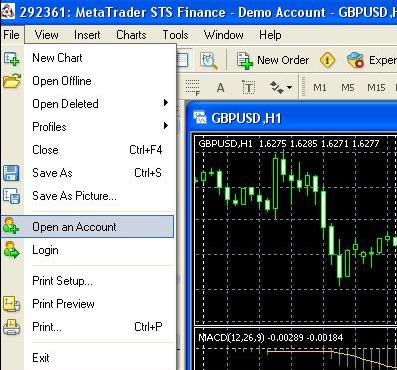
4. Fill up the needed data.
5. To activate the "Next" button and continue registration, it is necessary to flag "I agree to subscribe to your newsletters".
6. A server must be chosen to connect to. Addresses of available servers, their names and ping are listed there. The most preferable is the server having the lowest ping.
7. After the registration has successfully completed, a window will appear that contains information about the open account: "Login" — the account number, "Password" — the password for access, "Investor" — the investor's password (connection mode in which it is possible to check the account status, analyze the price dynamics, etc., but no trading is allowed).
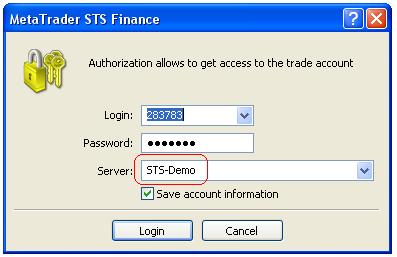
8. After registration has been completed, the new account will appear in the "Navigator — Accounts" window, and it is ready to work with. At that, the server sends a message to the terminal containing login and passwords of this newly opened account. This message can be found in the "Terminal — Mailbox" window. Besides, after the account has been successfully registered, it will be authorized automatically.
9. ECN / Interbank instruments are in the group FXReal1, extension ib
Demo accounts enable working under training conditions, without real money on them, but they allow to work out and test trading strategy very well. They possess all the same functionality as the real ones. The distinction consists in that demo accounts can be opened without any investments, though one cannot count on any profit from them.